
Print a portion of the WMA map
- 1 Zoom into the area of the map you would like to print.
- 2 Select your print option in the browser to print.
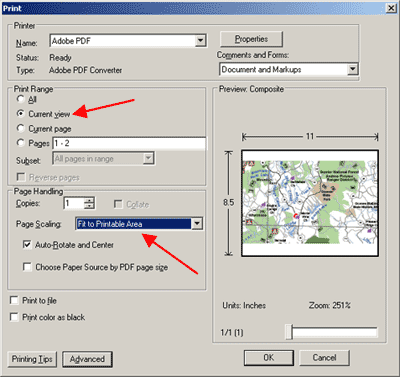
- 3The print dialog box like the image on the right should appear.
- 4Select the following attributes in your printer properties - under the heading "Print Range" make sure "Current View" is selected and under the heading Page Handling and then select from the drop-down box for "Page Scaling" the option "Fit to Printable Area" and then click OK.
Please Note: These directions should work for most people who have the web browser Internet Explorer. However, there are a number of variables such as web browser version, Adobe Reader version, and computer operating system that may effect this process.